
Typst for scientific journal : a code-free alternative
Typst may be an interesting alternative to LaTeX for authors who want to write and compose scientific documents using a more modern and accessible markup language.
However, preparing a manuscript is not the same as producing a journal scientific.
A journal needs to work with the files it receives from authors, review metadata, apply its editorial design, manage proofs, and generate different publishing formats. To cover this process, the team needs more than just a tool capable of creating a good PDF.
AMS —Auto Markup Styler— is a Typst alternative designed specifically for editorial teams. It allows you to transform Word manuscripts into PDF, HTML, and JATS XML from a visual environment, without requiring editors to learn a markup language or work with code.
Typst is simpler than LaTeX, but it is still a markup language
Typst is defined as a markup-based typesetting system and an alternative to word processors like LaTeX. Content is written using its own syntax, which is then processed to generate the document.
Its language may be easier to learn than LaTeX, but the user still needs:
- learn the syntax of Typst;
- use functions and commands;
- configure or adapt templates;
- check for possible compilation errors;
- convert the received manuscripts into your working structure.
For an author familiar with these types of tools, this system might be convenient. For an editor who receives articles in Word format and has to prepare numerous documents each year, it means incorporating a new language and an additional step into the process.
A scientific journal needs much more than a PDF
Editorial production begins once the article has been accepted.
From that moment on, the journal must:
- review titles, authors, and affiliations;
- Check abstracts, keywords, DOI and ORCID;
- structure tables, figures and references;
- apply its visual identity;
- prepare and correct the galley proofs;
- generate publishing formats;
- organize articles, issues and volumes;
- Prepare the content for the web and indexing .
Typst is primarily focused on document composition. While it can generate PDFs and is developing HTML export, its current official documentation still considers the latter incomplete and advises against using it in production.
Furthermore, JATS XML generation, metadata editorial review, galley proofs, and volume management are not part of an integrated editorial workflow equivalent to that of AMS.
AMS: an alternative to Typst designed for editors
AMS starts from a common reality: most journal receive manuscripts in Microsoft Word.
Instead of forcing the team to rebuild the article in a new language, AMS allows working directly from the received file.
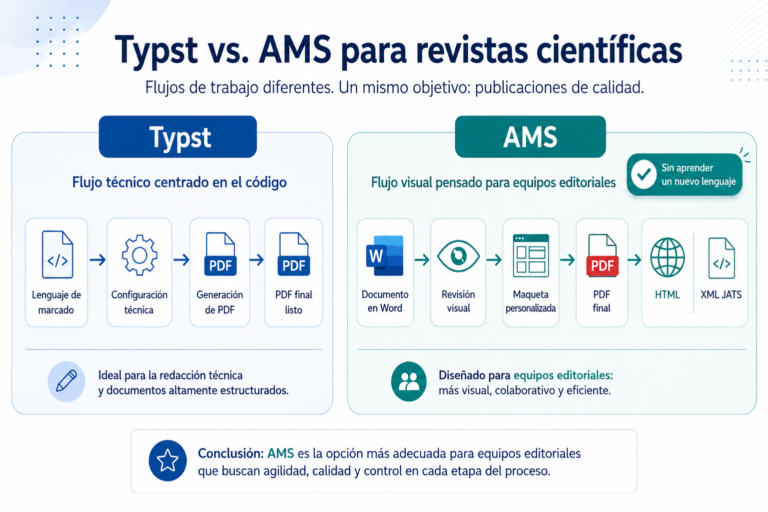
The process is visual and simple:
- The editor uploads the Word manuscript.
- AMS extracts and organizes the content.
- The team reviews and validates the metadata.
- The journal template is selected.
- The PDF, HTML, and JATS XML files are generated.
- The galley proofs and corrections are managed from the same environment.
It is not necessary to write code, memorize commands, or know the technical structure of an XML file.
The technology works in the background so the editor can focus on reviewing content and managing publishing . AMS also allows you to save templates, centralize galley proofs, manage volumes, and generate the final PDF for each issue.
Typst vs AMS for scientific journal
| Editorial need | Typst | AMS |
|---|---|---|
| Main user | Author or technical profile | Editorial team |
| Working method | Markup language | Visual interface |
| Learn a new syntax | Yeah | No |
| Working directly from Word | It requires adaptation | Yeah |
| Generate PDF | Yeah | Yeah |
| Generate HTML for publishing | Still in development | Yeah |
| Generate JATS XML | It requires an additional process | Yeah |
| Review scientific metadata | It must be configured | Integrated |
| Apply editorial templates | Through functions and configuration | Visual selection of templates |
| Manage galley proofs | That is not its primary function | Yeah |
| Manage items and volumes | No | Yeah |
| Recurring editorial production | It requires creating the flow | Integrated |
The difference isn't just in which tool generates the best document. It's in how much work the team has to do before and after generating it.
Typst helps you write and format documents. AMS helps transform manuscripts into scientific publications.
From Word to PDF, HTML and XML JATS without code
The PDF is still important, but it is no longer sufficient for many journal .
The same item may require:
- a PDF formatted for reading, downloading or printing;
- an HTML adapted to web publishing ;
- a JATS XML for structuring, interoperability, preservation and indexing .
With AMS, these formats are generated from a single editorial workflow. The team doesn't have to prepare each version separately or manually replicate the corrections.
This reduces duplication and prevents the PDF, HTML, and XML from containing different versions of the article.
It also allows the journal to maintain a consistent identity through its own templates with its fonts, colors, headings, tables, figures, licenses, DOI and citation data.
When is it advisable to choose AMS?
AMS is especially suitable for journal that:
- They receive most of their manuscripts in Word format;
- They don't want their editors to learn Typst, LaTeX, or XML;
- They need a visual and intuitive tool;
- They publish several articles per issue;
- require PDF, HTML and XML JATS;
- They want to automate typesetting in OJS;
- They need to review metadata and galley proofs;
- They wish to maintain their own visual identity;
- They want to reduce manual processes and duplicate files.
Typst may still be a good option for authors who write from scratch and are comfortable using a markup language.
When the need is editorial, recurring, and multi-format,
AMS is especially suitable for journal that:
- They receive most of their manuscripts in Word format;
- They don't want their editors to learn Typst, LaTeX, or XML;
- They need a visual and intuitive tool;
- They publish several articles per issue;
- require PDF, HTML and XML JATS;
- They want to automate typesetting in OJS;
- They need to review metadata and galley proofs;
- They wish to maintain their own visual identity;
- They want to reduce manual processes and duplicate files.
Typst may still be a good option for authors who write from scratch and are comfortable using a markup language.
When the need is editorial, recurring and multi-format, AMS offers a simpler and more complete workflow.
AMS is especially suitable for journal that:
- They receive most of their manuscripts in Word format;
- They don't want their editors to learn Typst, LaTeX, or XML;
- They need a visual and intuitive tool;
- They publish several articles per issue;
- require PDF, HTML and XML JATS;
- They want to automate typesetting in OJS;
- They need to review metadata and galley proofs;
- They wish to maintain their own visual identity;
- They want to reduce manual processes and duplicate files.
Typst may still be a good option for authors who write from scratch and are comfortable using a markup language.
When the need is editorial, recurring and multi-format, AMS offers a simpler and more complete workflow.
FAQ
Is Typst useful for laying out scientific journal ?
Typst can be used to typeset articles and other scholarly documents. However, a journal that works with Word manuscripts, metadata, galleys, JATS XML, and volumes will need additional processes or tools.
Can Typst work directly with Word documents?
Typst does not use Word as its primary working format. The content must be adapted or converted to their language before being typeset.
Can Typst generate JATS XML?
JATS XML is not part of Typst's native editorial workflow. Obtaining it requires conversion or additional development. AMS integrates JATS XML generation into the editorial production process.
Is AMS easier to use than Typst?
For a non-technical editorial team, yes. AMS uses a visual environment and doesn't require writing commands, editing code, or reconstructing each manuscript in a different syntax.
Can AMS be used with OJS?
Yes. AMS can complement OJS and handle post-acceptance production of the article: structuring, metadata, typesetting , galley proofs, and generation of PDF, HTML, and JATS XML.
Create your journal without learning a new language
Editors shouldn't have to become programmers to publish a scientific journal .
AMS allows you to work directly from Word, visually review the content, apply the journal template, and generate all the necessary formats from a single environment.
No code. No duplicate processes. No learning a new language.
Discover how AMS can simplify the editorial production of your journal and request a demo.